Mac workflow
iMic vs Genspark VoicePad: Do You Need a $99 AI Gadget?
November 17, 2026 · 8 min read · By Forthright Tech
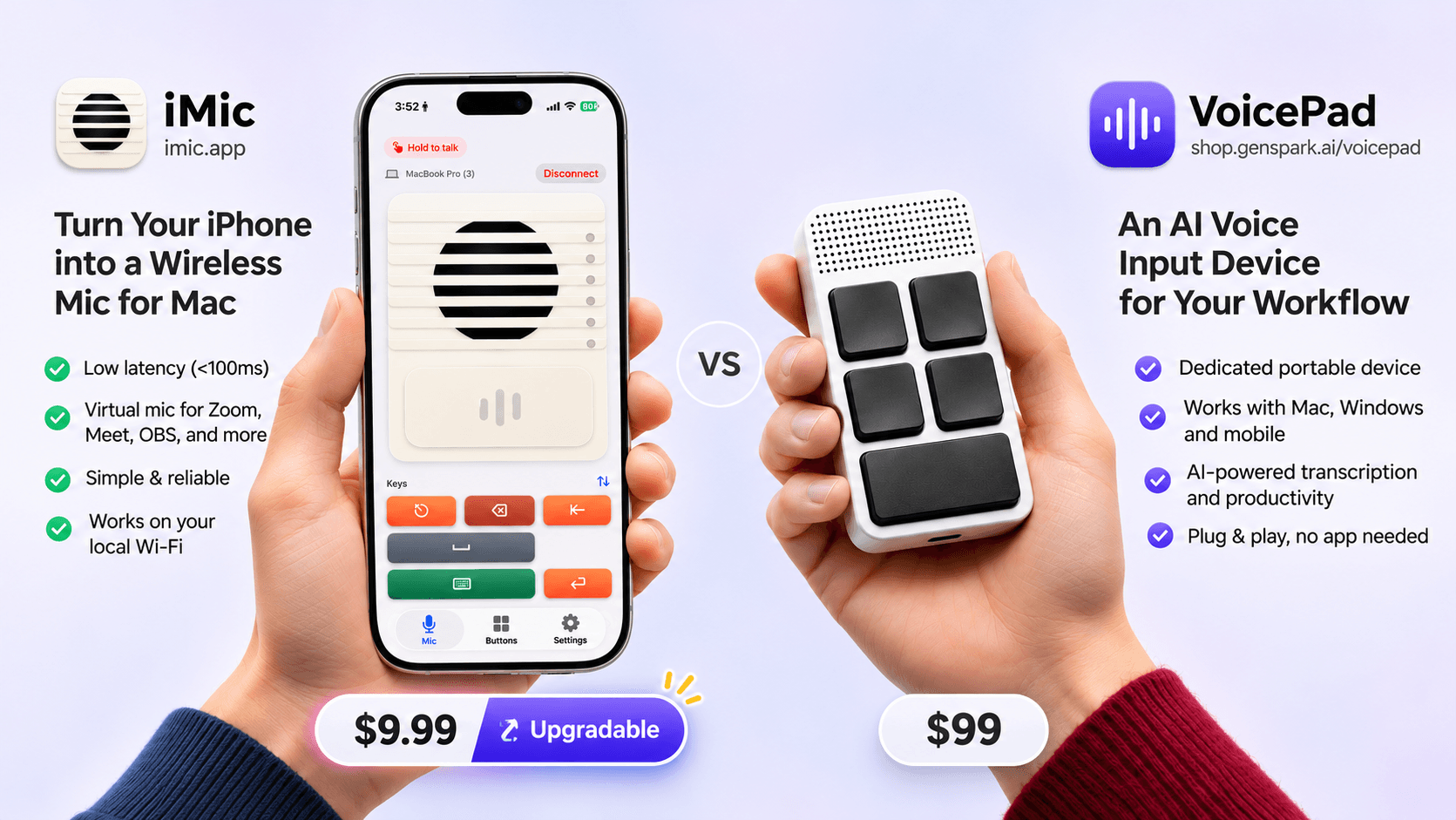
iMic vs Genspark VoicePad: why software on your iPhone beats a $99 AI desk gadget for Mac mic + remote workflows — with side-by-side comparison.
Start with the phone you already own. Before you spend $99 on a new AI desk gadget, try turning your iPhone into a Mac microphone and remote.
That is iMic — our product at Forthright Tech. It streams encrypted mic audio over your local Wi‑Fi, shows up as a system input named iMic, and doubles as a programmable shortcut remote. Pricing: $5.99/year (7-day free trial) or $9.99 lifetime (two Mac licenses).
Genspark SecondBrain VoicePad is a crowdfunded aluminum controller with five programmable keys. As of November 2026, the VIP Kickstarter reward is $99 against a $169 MSRP, with launch planned for November 24, 2026 and shipping targeted for January 2027 (VoicePad page).
This comparison is written by the iMic team. We will be fair about when hardware wins — then recommend iMic for most Mac + iPhone users.
Side by side: iMic first
Form factor — Left: iMic, the iPhone mic UI you already carry (from $5.99/yr). Right: VoicePad, a dedicated aluminum AI gadget ($99 VIP). VoicePad photo from Genspark’s public marketing page; used for comparison, not as an endorsement.
Same job — speak, trigger actions, get audio or text into your workflow. Different answer: software on a phone you carry versus new hardware to buy, charge, and pack.
Price at a glance — Left: iMic lifetime license at $9.99 (or $5.99/year with a 7-day trial). Right: VoicePad VIP Kickstarter reward at $99 (MSRP $169). As of November 2026.
Why choose iMic
Watch: The Best Mic for AI Is Already In Your Pocket
iMic is a dual-app system for iPhone + Mac:
- iMic for iPhone captures mic audio and streams it locally (encrypted, zero-config, no cloud relay). The same phone is a programmable remote for macOS shortcuts.
- iMic for Mac receives the stream, exposes an “iMic” virtual microphone to every Mac app (Zoom, Meet, Discord, OBS, ChatGPT, Wispr Flow, …), and fires shortcuts via Accessibility.
It is not a transcription engine and not an AI agent. It moves your voice (and optional button presses) to the Mac so your apps can listen. Overview: What is iMic?. Setup: iPhone and Mac setup guide.
How iMic looks in use — Left: configurable remote buttons on iPhone (push-to-talk, Spotlight, OBS, Raycast, and more). Right: the Mac menu bar companion; select iMic once in Sound settings, then use it in any app.
Controls side by side
Controls — Left: iMic maps phone keys to Mac shortcuts in software. Right: VoicePad has five physical hardware keys on the aluminum pad (Genspark marketing photo). Same idea, different cost and form factor.
iMic wins when you already hold a phone while you pace or sit away from the keyboard. VoicePad wins if you specifically want a dedicated tactile pad glued to the desk.
What VoicePad offers
VoicePad is a palm-sized CNC aluminum controller (about 85 g) with five customizable keys, dual mics, a magnetic mount, and roughly 20 hours per charge according to Genspark. Hold a key and speak; the Genspark Super App can dictate into text fields, open AI apps (ChatGPT, Claude, Gemini, Grok), capture meeting notes, or run Genspark Super Agent jobs. It targets Windows and macOS over Bluetooth, and can record offline without a computer.
VoicePad in hand — compact desk / travel form factor from Genspark’s VoicePad marketing page. A separate gadget to charge and carry alongside (or instead of) your phone.
Honest caveat: it is still a Kickstarter launch, so availability and final firmware are crowdfunding realities — not an App Store install today.
Feature comparison
| iMic | Genspark VoicePad | |
|---|---|---|
| Form factor | iPhone + Mac apps | Dedicated aluminum gadget |
| Price (Nov 2026) | $5.99/year or $9.99 lifetime | $99 VIP / $169 MSRP (+ optional $9.99 deposit that does not count toward $99) |
| Platforms | iPhone + Mac (local network) | Windows + macOS (Bluetooth + Super App) |
| Audio path | System virtual mic named iMic — selectable in Sound settings for any app | App-assisted dictation / AI keys; not a system virtual mic for every Mac app |
| Controls | Programmable phone remote / shortcuts | Five programmable hardware keys |
| Privacy / transport | Local Wi‑Fi / encrypted stream — no cloud relay | Bluetooth + Genspark Super App ecosystem; offline recording advertised |
| Availability | Available now | Kickstarter launch Nov 24, 2026; shipping targeted Jan 2027 |
| Extra ecosystem | Bring your own dictation / meeting / AI apps | Bundled Genspark Super Agent credits |
VoicePad pricing sources: VoicePad page and VIP deposit page. Confirm current numbers before you pledge.
Pricing reality
If you already own an iPhone and a Mac, VoicePad’s $99 early price is still roughly 10× iMic’s lifetime license — before another battery to charge and another object to pack. VoicePad’s retail path is listed at $169. iMic’s annual plan is $5.99 with a 7-day trial if you want to test first.
When VoicePad can still make sense
Choose VoicePad (or wait for it) if you:
- Prefer a dedicated desk controller with tactile keys
- Need Windows as a first-class platform
- Want offline recording that does not depend on a phone or open laptop
- Live inside the Genspark Super Agent ecosystem and value the bundled credits
- Like the jewelry / CNC aluminum form factor for its own sake
Our recommendation: choose iMic
For the overlapping Mac + iPhone use case — speak to AI apps, dictate, join meetings, trigger shortcuts — we recommend iMic:
- No new hardware SKU. You already carry the microphone and the buttons.
- A real system mic. Zoom, Meet, Discord, OBS, and dictation apps can select
iMiclike any other input — not only text injection into a focused field. - Local-only by design. Audio stays on your Wi‑Fi; there is no cloud relay in the product model.
- Programmable remote. Map phone controls to push-to-talk, Spotlight, Raycast, Alfred, OBS scenes, and more.
- Available now. Install, pair, and test today instead of waiting on crowdfunding fulfillment.
- Price. At $9.99 lifetime (or $5.99/year), trying software is a rounding error next to a $99–$169 gadget.
Related reading: Do you need a vibe coding mic?, Best microphone for Mac dictation, and unobtrusive mics for Wispr Flow.
Quick checklist
- Own an iPhone and work mainly on a Mac? Try iMic first.
- Main friction “buy another device” or “route the phone I have”? If the latter, skip the gadget.
- Need Windows or offline standalone recording today? VoicePad’s pitch is closer — verify shipping dates.
- Need a virtual mic inside Zoom/OBS, or only typed text in AI chat boxes? iMic is built for the system-mic case.
- Willing to wait until 2027 for hardware fulfillment? If not, software you can install this afternoon wins.
Try iMic
If the phone in your pocket can already be the mic and the remote, you do not need a $99 AI gadget to start. Get iMic — pair once, select iMic as your Mac input, and keep the tools you already use for dictation and meetings.
Ready to try iMic?
Turn your iPhone into your Mac’s microphone and shortcut remote. $5.99/year with a 7-day free trial, or $9.99 for a lifetime license on two Macs.
Get iMic